
A common question is, "How long should I keep my tax records (paperwork)?" While each person's situation is different, these tips will help you decide what you can get rid of. Read on to figure out your position.
Jump to:
- Key Takeaways
- How long should I keep tax records?
- Make sure you know your tax situation.
- Keep backup paperwork related to your exact tax situation.
- Keep bank statements with your tax return paperwork.
- Utility Bills - keep or toss
- Keep your long-term stored paperwork safe.
- Should You Go Paperless with Tax Records?
- How to Organize Digital Receipts in Your Home
- Shred any unwanted tax paperwork and statements.
- Don't forget to keep credit card statements.
- Keep paycheck stubs for one year or until you receive and verify your pay stuff details.
- Store all tax items in a single accordion folder each year.
- How do you make a personal tax record supporting paperwork accordion folder?
- Frequently Asked Questions About Keeping Tax Records
Key Takeaways
- Keep tax records for at least seven years; IRS recommends three years if not audited.
- Organize tax documents with an accordion folder (affiliate) and refer to specific retention times for each type.
- Consider going paperless by digitizing receipts and statements; the IRS accepts digital records.
- Shred unwanted paperwork to prevent identity theft and protect sensitive information.
- Consult a tax professional for tailored advice on your specific situation regarding tax records.
I would always side with the more conservative number of years when keeping my tax paperwork, usually seven years. While I would keep them for seven years, reducing the unnecessary paperwork I filed away was helpful around the third year. This task would allow me to fit at least two years in one bin. It would significantly reduce the amount of long-term storage space.
How long should I keep tax records?
The IRS says three years if you have not been audited. Below are other tips for organizing your tax paperwork and supporting documents. Visit my other posts I liked to this post for deeper, detailed steps.
Quick Reference: How Long to Keep Tax Records
Not everyone's situation is the same, but this general guide gives you a solid starting point. Always check with your accountant for your specific circumstances.
| Document Type | How Long to Keep |
|---|---|
| Federal and state tax returns | Permanently (or at minimum 7 years) |
| W-2s and 1099s | 7 years |
| Supporting receipts and canceled checks | 3–7 years |
| Bank statements (tax-related) | 7 years |
| Credit card statements (tax-related) | 7 years |
| Paycheck stubs | 1 year (until W-2 is verified) |
| Utility bills (home office/business) | 7 years |
| Utility bills (no business use) | Until bank statement clears |
| Property records (home purchase, improvements) | As long as you own the property + 7 years |
| Investment and brokerage statements | 7 years after selling |
| Retirement account records (IRA contributions) | Permanently |
| Business records (receipts, payroll, contracts) | 7 years minimum |
Important note: The IRS generally has 3 years to audit a standard return, but that window extends to 6 years if income was significantly underreported, and there is no time limit for fraudulent returns. Keeping 7 years gives you a safe (affiliate) buffer for most situations.
Make sure you know your tax situation.
When a person gets audited, they are more likely to get reviewed again. So, keeping your paperwork for the 7 years may be a better choice to ensure you have everything.
Keep backup paperwork related to your exact tax situation.
If you own a rental property or a small business, keep all your paperwork, such as receipts, canceled checks, tax returns, payroll or subcontractor paperwork, bank statements, and liability taxes paid reports/cleared checks.
Keep bank statements with your tax return paperwork.
If you have a bank statement with many charities, mortgage payments, and home improvements, you should keep it for reference rather than for audits. Check images are usually in statements now, so you don't need to keep your actual checks if you don't want to.
Utility Bills - keep or toss
If you do not own a business or deduct a home office, only keep your utility bills until you have reviewed your bank statement and the charge has cleared.
But, if you are a business owner or deduct a home office, you should keep all your utility bills as supporting documents for your tax return.
Keep your long-term stored paperwork safe.
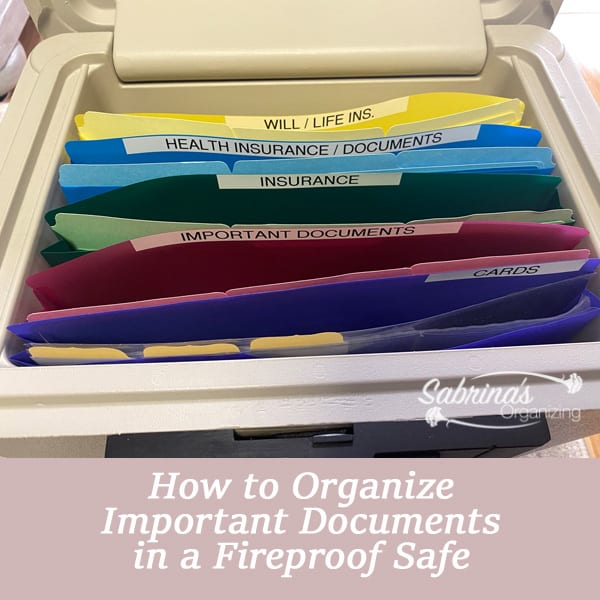
Find a place where you can save all your documents. Clear plastic bins (affiliate) with tight lids work nicely. If you want, you can place it in a fireproof safe (affiliate). If you don't feel it is necessary, get a fireproof safe (affiliate) for your long-term paperwork and receipts from items you purchased for your home. This tip will be helpful if you ever need to claim items for your home with your insurance company.
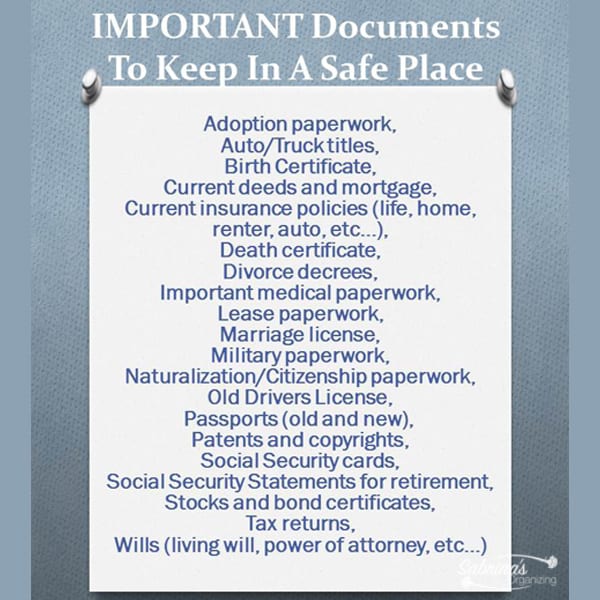
Visit our post: 20 Personal Important Documents to Keep Safe for the list of paperwork to know what these papers are and how to organize them.

Fireproof Document Box with Lock, File Organizer
Buy Now →(affiliate)
Should You Go Paperless with Tax Records?
Going digital with your tax records is a great way to reduce physical (affiliate) storage while keeping everything organized and accessible. The IRS accepts digital records, so there is no requirement to keep paper originals if you have reliable digital backups.
What to scan and store digitally:
- All receipts and supporting documents
- Bank and credit card statements (though many banks already provide these digitally)
- W-2s, 1099s, and other income statements
- Copies of filed tax returns
Tips for going paperless with tax records:
Use a consistent folder naming system. Create a folder on your computer (affiliate) or cloud storage for each tax year, such as "Tax Records 2026," and add subfolders that mirror your accordion folder (affiliate) tabs (affiliate) - Income, Deductions, Bank Statements, Final Return, etc.
Scan receipts immediately. Apps like Adobe Scan, Microsoft Lens, or even your smartphone's built-in document scanner (affiliate) make it easy to capture receipts as you go rather than sorting through a pile at year end.
Store in at least two locations. Save files both in a cloud service (Google Drive, iCloud, Dropbox) and on an external hard drive. This protects you if one storage method fails.
Use clear, descriptive file names. Name files with the date and description, for example: "2025-03-15_Office-Supply-Receipt.pdf" - this makes it easy to find specific documents if you're ever audited.
Keep digital records for the same length of time as paper. Going paperless doesn't shorten your retention timeline - you still want to keep records for 3-7 years depending on your situation.
How to Organize Digital Receipts in Your Home
Everything is digital these days, even all the purchases and statements we receive almost every day. And paper store receipts are becoming increasingly difficult to keep track of these days.
Shred any unwanted tax paperwork and statements.
To protect yourself from identity theft, ensure all papers, even those that only have your address on them, are shredded and disposed of properly. A cross-sectional shredder (affiliate) is best so no one can read the ink easily. This type of shredder (affiliate) does two different cuts when you feed the paperwork into it. Make sure the papers look like confetti when you are finished. Visit our updated yearly shredder events in the Southeastern PA area.
Don't forget to keep credit card statements.
Keep your original receipts until you receive your monthly statement, then shred them once they are all reconciled. If there are any tax-related charges on the statement, keep the statement and the receipt for 3 or 7 years. Learn how to keep your digital statements and receipts on our post: HOW TO ORGANIZE DIGITAL RECEIPTS IN YOUR HOME
I've used Quicken products for a very long time and feel that the product's completeness allows us to see our business, property, and investments in one place, so we truly know the net worth of all our assets and liabilities.
Products To Help You Manage Your Money:
Quicken Simplifi - Great for personal tracking
Quicken Business & Personal - perfect for mobile users strictly
Classic Quicken for Windows and Mac - Ideal for laptop users and convenient for viewing on the go.


Keep paycheck stubs for one year or until you receive and verify your pay stuff details.
When you receive your W-2, make sure your last pay stub for the year matches with the W-2. If it does, you can get rid of all the pay stubs. If it doesn't, contact your employer and keep the last pay stub until the error is corrected. Shred all the other pay stubs for that year.
Store all tax items in a single accordion folder each year.
Keeping all my business files in one 13-tab accordion folder (affiliate) allows me to pull them out when I need them without losing anything. If you don't have a business, you can create an accordion folder (affiliate) that holds all your supporting paperwork.
Here are the tabs (affiliate) we use to create our household's supporting tax paperwork accordion folder (affiliate).
First, you need one 13-tab accordion folder (affiliate) with a covered affixed lid. Something like these you can buy on Amazon (affiliate) (affiliate).

Accordion File Organizer, 13 Pockets File Folders, Letter Size with Colored Tabs
Buy Now →
Accordion File Organizer, 13 Pockets File Folders, Letter Size
Buy Now →(affiliate)
Visit our other paper management posts!


How do you make a personal tax record supporting paperwork accordion folder?
Then, add these tabs (affiliate) below.
Quicken (affiliate) or QuickBooks Tax Summary - whichever one you use is fine.
The first five income groups can be placed in one tab if you feel you are running out of tabs in your accordion folder.
- Income - W-2, 1099-misc, 1099-R - Add to this section any documentation statement you received from your employer, federal government, or contractors.
- Income - Bank interest - This one is rarely used. If it applies to your situation, feel free to add it.
- An Income - Distribution tab is usually for people who receive S.S. or other pension distributions.
- Income - Capital Gains - This section is perfect for the paid-out capital gains statements you received.
- An Income - Rental Property income and expenses - If you have rental property, you can split this one into two sections. One section is for income, and the second is for the property's costs. If you have several properties, create two sections for each property and add another accordion folder. Accordion folders only have a maximum of 13 tabs (affiliate).
Deduction - Charitable deduction - cash and donated items - While I know this may all change this year if you still want to track your deductions, add a section for donations.
A Deduction - Medical Deduction - if you have any medical payouts, create a section to track them.
Deduction - Contribution to a 529 plan for the education fund. We can deduct some of our 529 contributions in PA, so I added this section to our accordion folder.
Deduction - Real estate taxes paid/ Mortgage interest paid/ Refinanced taxes paid - This section can be combined. It's not necessary to separate them.
Have a tab for the final tax returns
Federal Tax Return - Have a section just for the copy of your official federal tax return that you sent out.
State Tax Return - Same for the state tax return. Create a section that includes a copy of everything you sent to the state.
Local Tax Return - If you have a local tax return, create a section with all the paperwork you sent to the local tax agency.
Keep in mind that accordion folders (affiliate) work great for small income tax returns and even for people with small businesses. I like to have one for my business and one for our joint filing. These two accordion folders give me a way to review all my business separately from my personal.
Good luck with your paper-purging process and with setting up your new personal tax return supporting-paperwork system. I hope it creates space in your home.
Want more information on when you should discard your papers?
Here are additional sites to help you. While the IRS site may seem vague, it will give you a starting point for determining what you want to do. After reviewing this information, contact your accountant and ask what they recommend.
How long should I keep records? This page is intended for self-employed individuals, but the IRS uses it when you type in "individuals, how long should I keep records?"
Frequently Asked Questions About Keeping Tax Records
Most tax professionals recommend keeping your actual tax returns permanently, or at minimum for 7 years. The supporting documents (receipts, statements, etc.) can be reduced after 7 years, but the returns themselves are worth holding onto indefinitely. They can be useful for loan applications, Social Security verification, and other financial decisions down the road.
If the IRS audits you and you cannot provide supporting documentation, you may be unable to prove deductions or income figures - which could result in additional taxes, penalties, or interest. Keeping records for the full recommended period protects you from this risk.
The IRS accepts digital records, so going paperless is completely fine. The key is to make sure your digital files are backed up in at least two places (such as cloud storage and an external hard drive) and organized clearly so you can find specific documents quickly if needed.
Keep records related to your home - purchase price, closing costs, home improvement receipts - for as long as you own the property plus at least 7 years after you sell it. These records are used to calculate your cost basis, which affects capital gains taxes when you sell.
Yes. Business records generally require longer or more detailed retention than personal records. If you own a rental property or a small business, keep all receipts, payroll records, contracts, and supporting documents for at least 7 years. Consult your accountant for your specific situation, especially if you have employees or operate as an LLC or corporation.
Always shred documents before disposing of them - never simply throw them in the recycling or trash. A cross-cut shredder (which makes confetti-like pieces) is the most secure option. For large quantities, community shredder events are a great resource. Visit our updated shredder events page for events in the Southeastern PA area.
Need more help organizing your tax records?
Visit these recent posts for even more tips and tricks when setting up a new tax records system.
Important Personal Documents to Keep Safe (affiliate)
4 Ways to Organize Incoming Paper Mail
7 Clutter-Free Ways to Manage Papers
14 Tips for Organizing Long-Term Files
Well, there you have it. This post will help you get inspired to rid yourself of tax papers and create a new, easy-to-manage process for future use. If you have specific questions about discarding your long-term tax records, contact a professional who knows your situation.
Money Management Posts



Please note these are affiliate links through Amazon (affiliate), and at no additional cost to you, I will earn affiliate fees if you decide to make a purchase.



Julie Bestry says
Oh, I just love this topic. Maybe it's because it's like a game, and once you know the fixed rules and then can identify the "if-then" set-ups for everything else, it's just about following the steps.
Of course, as you allude, receipts for business purposes are a whole different issue. I've had clients who were therapists, for example, and the tax-related records required to be kept by the federal government vs. the state government (and I operate in two different states) were different, and then the state board for mental health professionals had a completely different set of financial document retention requirements for medical financials at odds with the state's regular retention schedules for businesses.
This just makes me realize how long I've been organizing. VERY early in my career (so, around the turn of the century), I attended an IRS "teleseminar" (on the phone) for accountants, bookkeepers, and organizers. When we asked about maintaining scanned digital copies of receipts in lieu of the originals, the panel was at a loss. They loved the idea of scanned copies and said yes, we could scan them...and then print them for the IRS. We asked if we could advise clients to keep only scanned copies and delete the original, crumpled bits of paper, and two of the three panelists were apoplectic, and insisted that no, there was no way to prove that a scanned receipt hadn't been doctored. (Meanwhile, even without AI, way back then, you could create a fake receipt if you tried hard enough.) It took the IRS about ten years past when they first allowed scanning (in 1997) to accept scanned documents without requiring people keep the paper originals.
Olive Wagar says
Thanks for the helpful & concise information. I think people let fear override logic with tax papers!! I like the idea to use accordion files--and it helps you be realistic about what you really need to keep. It gives clients a visual limit for their tax papers. I put my older returns in 9 x 12 envelopes taped shut...just in case the Smithsonian wants a sample!! I know it is completely unnecessary, but it doesn't take up that much space & It all fits in one drawer.
Janet Barclay says
I have to say that it felt really weird to get rid of business financial docs once I'd been in business for more than 7 years! It was tempting to keep it for historical reference, but one must be practical...
Melissa says
Love reading more on this topic! I'm trying to help my clients organize their paperwork prior to filing this year. Great resources!
Seana Turner says
This is one of those topics that can make you feel a little sick to your stomach! I always suggest people keep the documents if they feel queasy, as there are some documents that should be kept indefinitely. Great tips here. I'm pretty glad I'm not an accountant!
Linda Samuels says
Oh, how I can relate to this post, Sabrina! One of my favorite things to do at the year end is to clear out the past year's receipts and statements to make room for the current year. With the exception of the actual tax returns, that our accountant suggested keeping indefinitely, the supporting documents he recommended keeping 7 years from the date of filing. As you mentioned, it's important to check with your accountant because everyone has a different tax situation. The other part of year-end clear out that I love is shredding the older group of papers. I love letting go of the papers that are no longer relevant. It's so cathartic.